
Subscribe by Email

Your email:

About

Mike DamphousseMike
Damphousse

Green Leads' Founder, CEO and CMO, Mike Damphouse, writes frequently about b2b marketing, demand generation, appointment setting, lead gen, and marketing in general.

Follow Us


Green Leads' Chris Snell blogs:
The CRAP Report

Hubspot Certified Professional

Alltop, confirmation that I kick ass

B2B Marketing

Lead Gen ROI Calculator

Appointment Setting Quality vs Quantity

Got Demand Gen?


Smashmouth B2B Blog: Sales & Marketing Demand Gen

Current Articles | RSS Feed RSS Feed

Lead Gen Tips: Find LinkedIn Names That Aren't In Your Network

Share on Twitter Twitter | Share on Facebook Facebook | Submit to Digg digg it |  Add to delicious  delicious |  Submit to StumbleUpon StumbleUpon |  Share on LinkedIn LinkedIn | Submit to Reddit reddit 

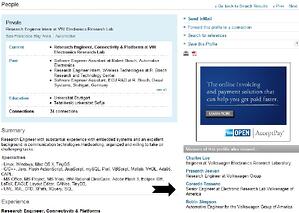
Most sales people today have found that using LinkedIn as a research tool to identify specific prospects has been a fantastic way to find the needle in a haystack of potential leads.  However, LinkedIn doesn't always show you all the names of the individuals your search produces:

lead gen tips linkedin

So how do you find this specific person's name?  Just three more clicks according to Green Leads' BDR Mira.

  1. Click on the Title, which brings up the full profile.
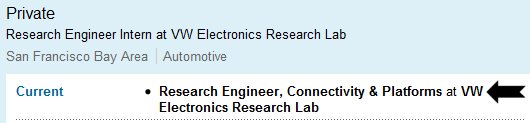
    lead   gen tips linkedin 

  2. Remember the Title, and look to the right where it says Viewers of this profile also viewed...  Once there, find a contact with a similar title/company -- In this case, Gerardo (hard to see).
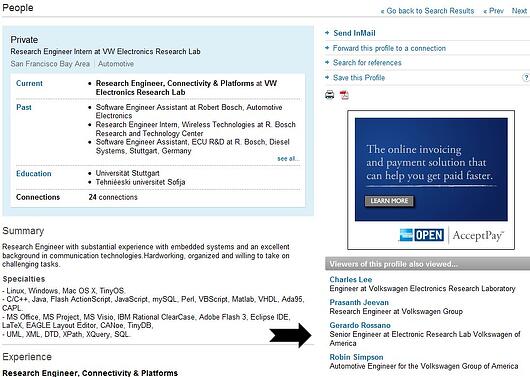

  3. Now while remembering the title/company of the prospect you want "Research Engineer Intern at VW Electronics Research Lab", click on the name of the person with the most similar title/company that we found above, Gerardo.
  4. Up pops Gerardo's profile, now look to the right again, and find a contact with a similar title/company to Gerardo in the "also viewed" section -- this is most likely your prospect.  So Tanya, expect my call.
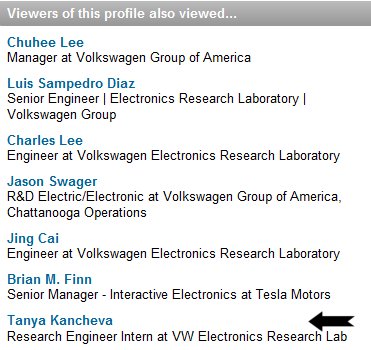
    lead     gen tips linkedin

If you have any LinkedIn tips, or Lead Gen Tips in general, please share them.


Comments

Excellent tip to get even more value out of our LinkedIn experience. Hoping to hear how it goes with Tanya!
Posted @ Thursday, April 29, 2010 9:31 AM by Miles Austin
Great hack. Why anyone would hide their name on Linkedin is beyond me,but somepeople do. This is a great example of the new transparency. Anyone, anywhere can get to anyone else with just a few mouse clicks.
Posted @ Thursday, April 29, 2010 10:54 AM by Dan Tyre
Very useful tip! In fact, I like it so much that I'm motivated to view your other B2B tips this weekend. Thanks.
Posted @ Friday, April 30, 2010 7:38 AM by Brenda Kelly
Right on Michael. I have been doing this myself since quite some time now!
Posted @ Monday, August 30, 2010 6:10 by Laura
Post Comment
Name
 *
Email
 *
Website (optional)
Comment
 *

Allowed tags: <a> link, <b> bold, <i> italics